

Connect
instantly in 140+
countries with
NETGEAR eSIM
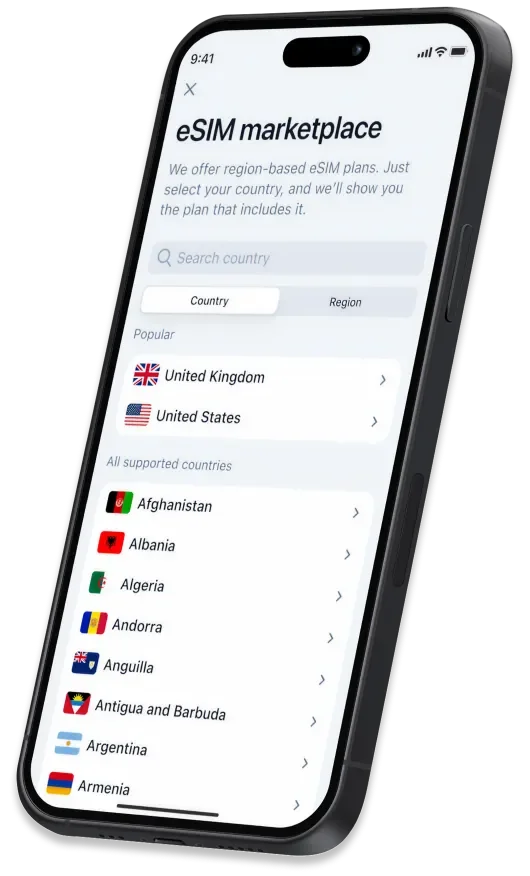
Skip the SIM card shuffle. With NETGEAR eSIM, you can activate flexible, high-speed data plans in minutes and stay connected across 250+ global networks — all from the NETGEAR app.

What is an eSIM?
An eSIM (embedded SIM) is a small, built-in chip inside your device. It does everything a traditional SIM card would, but without the need to insert or swap a physical card.
eSIMs are already part of the latest smartphones, tablets, wearables, even cars, and now, with NETGEAR, they’re available on mobile hotspots too.

What are the benefits of eSIM?
Instant activation
Skip the shipping and store visits. Purchase your eSIM online and get connected in just a few steps.
Built-in flexibility
Easily switch between carriers or data plans whenever you need—no SIM swapping required.
One device, many profiles
Keep separate profiles for work, travel, and personal use, all on a single device.
Why choose NETGEAR eSIM
The only eSIM purpose-built for your NETGEAR device.

Easy to connect, simple to manage
Set up your eSIM in minutes and manage your data with ease, tracking usage and adding more coverage as you go.

Flexible, no-contract plans
Only pay for what you need, when you need it. Transparent pricing. No hidden fees.

Fast enough for everything you do
Experience fast, reliable connectivity for video calls, streaming, gaming, and downloads. With access to over 250 networks worldwide, you don’t have to rely on slow, unreliable public WiFi.

No SIM card, no hassle
Skip the stores and fiddly cards. Activate instantly in-app, with no risk of losing or damaging a SIM.

Stay connected worldwide
140+ countries. 250+ networks. Wherever you go, you’ll stay connected.

Designed, tested & trusted
NETGEAR eSIM is purpose-built for NETGEAR devices, ensuring effortless setup and fast, reliable connectivity.
How to get started
Purchase an eSIM and get connected using these four simple steps

Get the NETGEAR App
Download and install our app from your preferred app store.

Choose Your Plan
Find your destination country or global coverage.

Activate Instantly
Connect to the best available local network.

Manage With Ease
Track usage, get alerts, and add more data anytime with just a tap.
Download the NETGEAR App
Activate and manage your eSIM in minutes. Explore plans, track usage, and top up anytime, all from one simple app.
 |
 |

Experience eSIM with M7 Portable WiFi Hotspot
Get connected instantly with the Nighthawk M7 — NETGEAR’s first mobile hotspot with built-in eSIM support. Wherever you’re headed, get WiFi that’s fast, reliable, and worry-free.
Frequently asked questions
What is an eSIM and how is it different from a SIM card?
An eSIM (embedded SIM) is a digital version of a traditional SIM card that’s built directly into your device. It connects you to mobile networks without inserting or swapping plastic cards. With NETGEAR eSIM, you can activate plans instantly, and manage everything digitally through the NETGEAR app. Learn More
Is NETGEAR eSIM safe?
Yes. Unlike a physical SIM card, NETGEAR eSIM is built into your device and can’t be misplaced or removed. Plus, when you connect through the M7, you use your own private, encrypted NETGEAR hotspot instead of public WiFi — helping keep your data and identity protected around the globe.
Which countries are covered?
NETGEAR eSIM works in 140+ countries across 250+ partner networks, providing reliable 5G and 4G coverage wherever you travel. All eSIM plans are regional, but searching by country can help you find a plan that works for your travel needs. Find a full list of countries here
What happens if I run out of data?
You can easily buy a new plan directly in the NETGEAR app. Manage and track your usage effortlessly, and stay connected without hidden fees or roaming charges. Learn more
Can I switch plans or countries easily?
Yes. With NETGEAR eSIM, changing plans or destinations takes just a few taps. Open the NETGEAR app, select your new country or data plan, and follow the on-screen steps to reconnect in minutes. Learn More
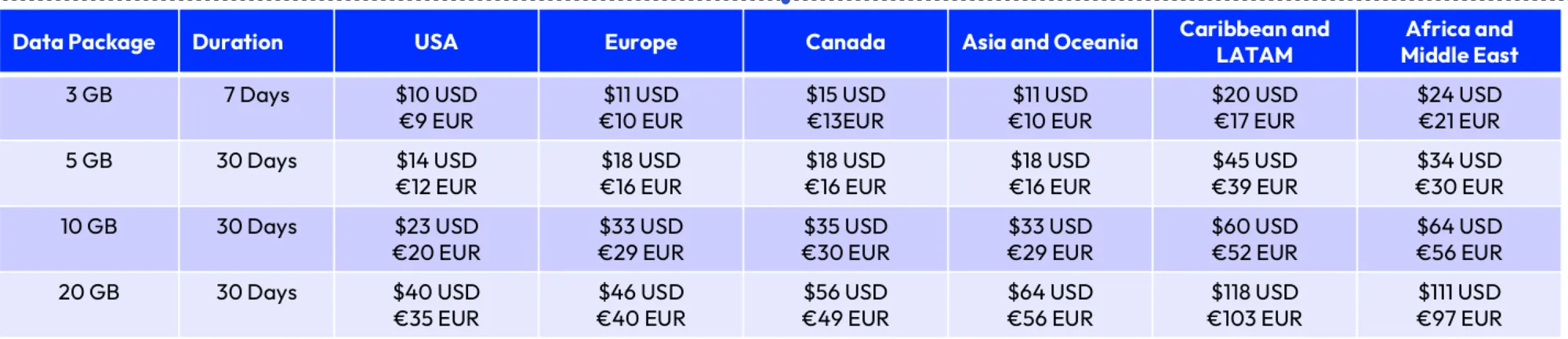
What do data plans costs?
Current pricing. Subject to change.
What NETGEAR devices support eSIM?
Currently, the NETGEAR M7 mobile hotspot supports eSIM technology.
Can I use NETGEAR eSIM for multiple devices?
Yes. Your NETGEAR M7 portable WiFi hotspot can share its eSIM connection with up to 32 devices at once, so laptops, tablets, and phones can all stay online together.
Does eSIM drain my phone battery?
No. When you connect through the M7 portable WiFi hotspot, it handles all data traffic — keeping your phone’s battery available for calls, navigation, and other tasks.
Can I still use a physical SIM?
Yes. The NETGEAR M7 supports both physical SIM cards and eSIMs, giving you complete flexibility to choose your preferred carrier or switch as needed.
How do I contact support?
You can reach NETGEAR support 24/7 through the NETGEAR app or online at netgear.com/support. Our experts are always available to help with setup, activation, or troubleshooting.